Webhook Documentation
Overview
Commerce Webhooks give you a single, omnichannel stream of real‑time commerce events the instant they occur: a payment moves from authorization toward capture, a refund finishes, a payout lands, a checkout changes course, a POS transaction is recorded, or a case is updated. Each notification arrives as a uniform HTTPS POST with a clean, consistent JSON structure—no separate formats for online versus in‑store. Instead of polling to discover what changed, you receive the authoritative snapshot ready for action: release an order on capture, reconcile a payout, alert support on a case update, or feed analytics with fresh POS data.
Why Webhooks vs API Polling
Instead of repeatedly calling our APIs to “see if anything changed”, you let changes come to you. That means:
- Latency: Immediate delivery vs periodic batch pulls.
- Efficiency: Network usage scales with actual changes only.
- Idempotency: Each event carries a unique id usable as a durable key.
- Completeness: Lifecycle transitions (authorization, capture, refund, reversal, chargeback) arrive even if the merchant system was offline earlier; replay occurs when connectivity returns.
- Decoupling: Downstream systems react without tight coupling to the payment processing schedule.
Use direct API calls for one‑time lookups, historical backfills, audit checks, or recovery after a severe outage. Use webhooks for all live progression and cross‑system synchronization.
Key Webhook Usage Benefits
- Unified Omnichannel: One format for online and in-store payment lifecycle events.
- Real-Time State: Immediate status propagation (authorization, capture, refund, payout credit, etc.).
- Idempotent & Safe: Each event has a unique `eventId` enabling safe replay handling.
- Secure Delivery: HMAC SHA-256 signatures with constant‑time verification.
- Predictable Evolution: Versioned contract, explicit changelog and deprecation notices.
- Minimal Polling: Full payload snapshots reduce follow-up API calls.
Typical Use Cases
- Update order status when a payment is authorized, captured, refunded, or reversed.
- Trigger refund flows from a POS return.
- React early to chargeback events for risk decisions.
- Sync checkout changes with ERP/OMS.
- Consolidate multi‑channel basket lifecycle (commerce case + checkout + execution + payment information).
Core Concepts
| Term | Meaning |
|---|---|
| Omnichannel | Single webhook model for eCommerce + POS; channel appears as data only. |
| Event Type | Short code describing what changed (e.g. `payment.captured`). |
| Snapshot Payload | Event includes current state of its object(s). |
| Idempotency | Unique event `id`; store it to prevent duplicate processing. |
| HMAC Signature | Header proving authenticity; verify before acting. |
| Status Category | High-level lifecycle grouping (e.g. `COMPLETED`, `PENDING_PAYMENT`). |
| Chargeback | Issuer‑initiated reversal (see payment chargeback events). |
Getting Started
Commerce Webhooks notify your system in real time when important payment, refund, payout, checkout or commerce case events occur across all channels (eCommerce + POS) via a single, unified delivery format. Each webhook carries a complete snapshot of the relevant domain object so you can update internal state without additional GET calls.
SUPPORTED EVENT CATEGORIES
| Domain | Representative Events (expamples) | Purpose |
|---|---|---|
| Payment |
payment.authorized, payment.captured, payment.sale, payment.refunded, payment.reversed, payment.chargeback | Lifecycle of a payment transaction |
| Refund | refund.requested, refund.approved, refund.captured, refund.cancelled | Refund process states |
| Payout | payout.created, payout.approved, payout.credited, payout.reversed | Merchant outbound fund movement |
| Commerce Case | commerce-case.created, commerce-case.updated | Order/Case context changes |
| Checkout | checkout.created, checkout.completed, checkout.expired | Checkout progression |
| Payment Execution | payment-execution.initiated, payment-execution.completed | Payment operations specific processes |
| Payment Information | payment_information.created | Near time notification of a terminal transaction / POS payment. |
All Event Types are listed in the API documentation
HOW IT WORKS
STEP 1: CONFIGURE ENDPOINT
Register Webhook endpoints inside the Portal.
- Configuration → Webhooks
- Add one or multiple webhook endpoints
- Define the purpose and intent for that specific webhook, what data is to be expected as from Payments, Refunds, Payment Information-POS , etc.
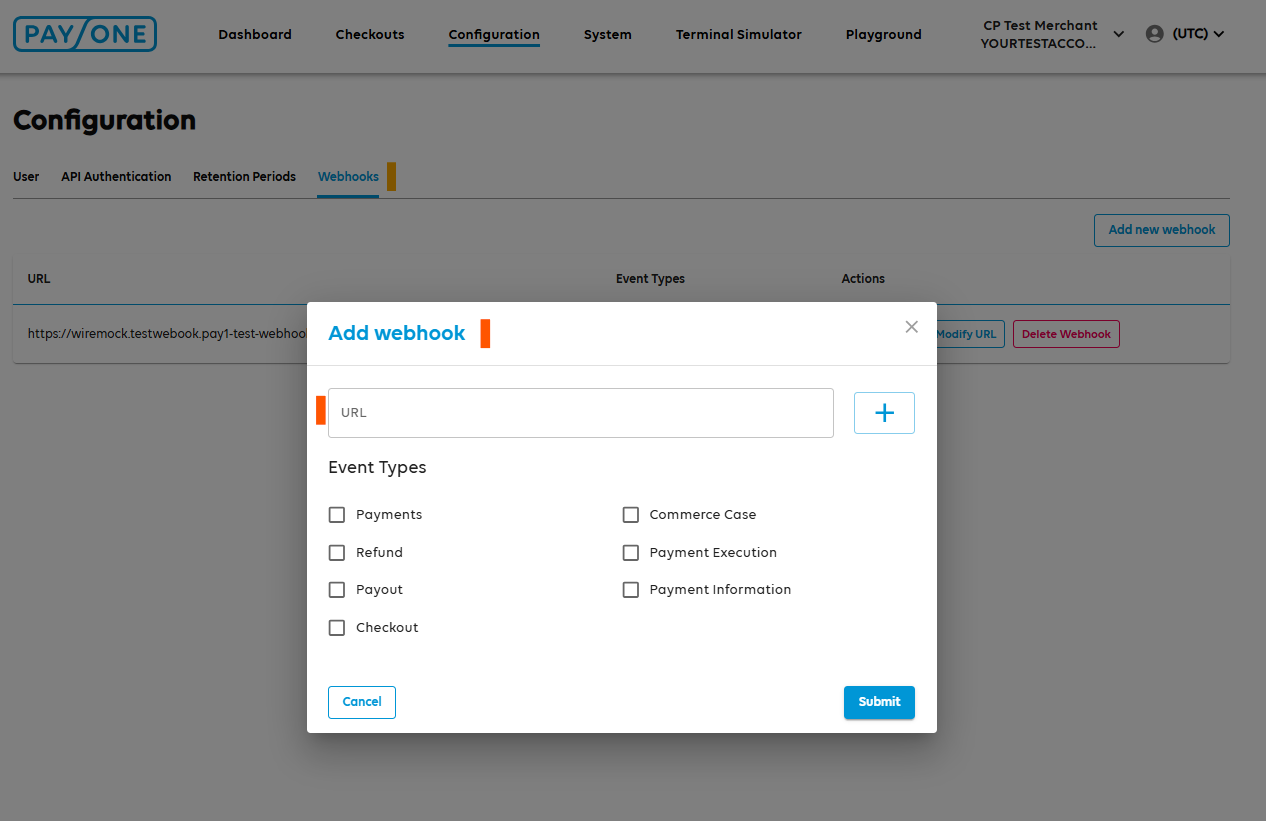
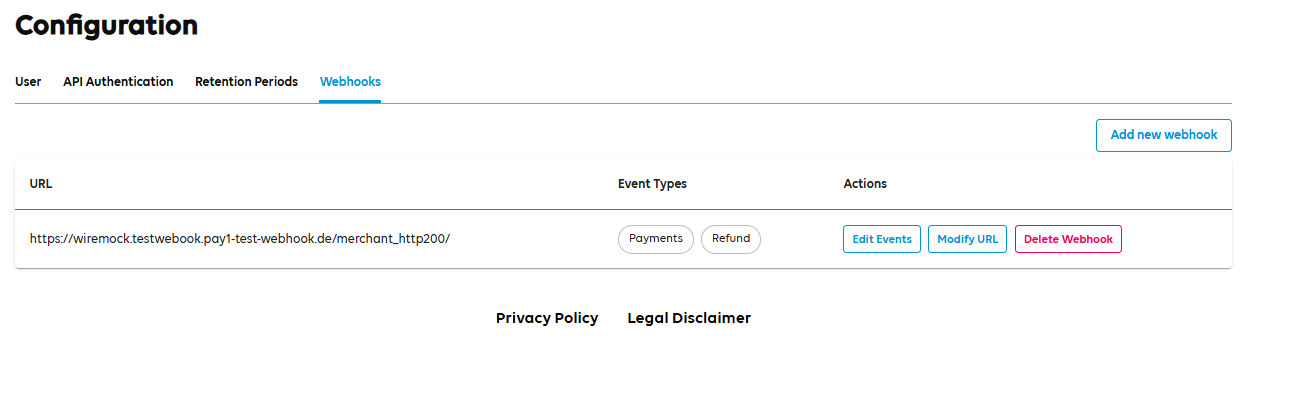
Click Submit and observe the active Webhook endpoints in main view:
STEP 2: VALIDATE HMAC CREDENTIALS
When processing webhooks, we need to make sure that information is not tempered with, is fully secure and reliable. That's why´, we will create an HMAC signature of raw webhook message and pass the information in the Webhook's header.
HMAC signing ensures each webhook you receive is authentic and unchanged: the platform calculates a SHA‑256 HMAC over the exact raw JSON payload using your Primary API KEY and SECRET, adds the digest in a signature header, and you recompute and constant‑time compare before parsing. Any alteration—even a single character—produces a mismatch, blocking forged or replayed events without relying solely on TLS logs. Operationally the rule is: verify first, then parse, then execute business logic; on failure, discard quickly and log minimal metadata (never the secret or full body). The outcome is a reliable, auditable stream that lets you automate confidently without added latency or integration complexity.
Example Header Information:
x-gcs-keyid: xxxxx-xxxx-xxxx-xxxx-bdfa6f87a1b2
x-gcs-signature: xxxxxx/IF3tkzmD/lU7xxxxxxxx/xxxxxxxxxx+Rd2s=
- Where the x-gcs-keyid represents the Primary Key value from your API Authentication credentials used for sending requests.
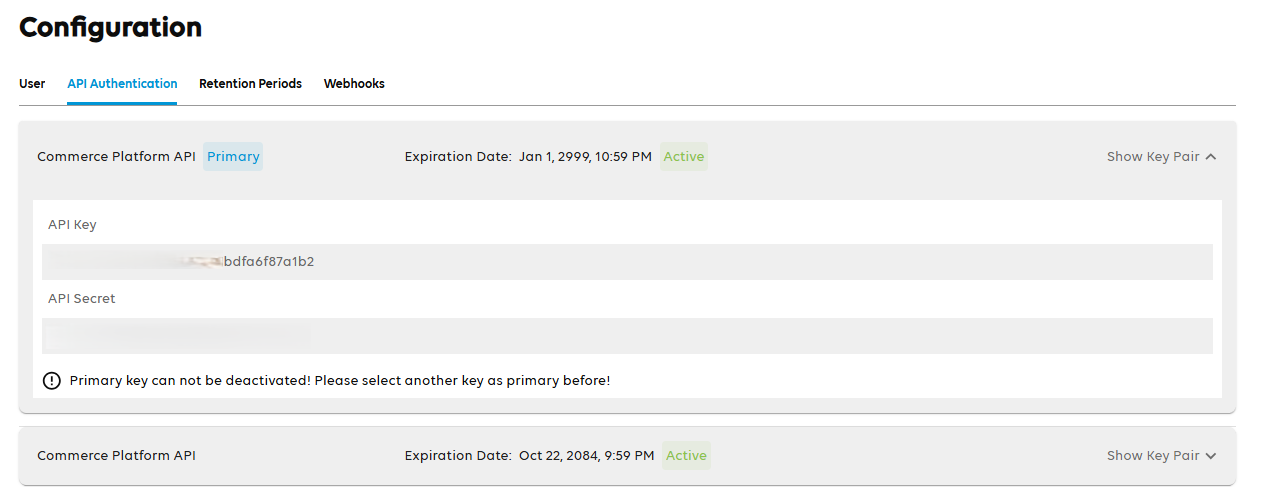
- The x-gcs-signature will represent the value we calculated following the algorithm
You will create the same signature and in case both values match then the Webhook content is legit and unaltered.
STEP 3: PARSE WEBHOOK CONTENT
Following Webhook type configured inside the Portal, you will receive the specific event when this is triggered / occurring inside Commerce Platform. Based on API documentation ( LINK ) the webhook content is grouped as:
Top-Level Metadata Fields
The JSON root includes:
- apiVersion: A short string such as "v1" indicating the contract version.
- created: An ISO8601 timestamp marking when the webhook was generated (not when received).
- id: A globally unique identifier for this webhook event. Use this as the idempotency key.
- merchantId: Your merchant identifier as registered in the platform.
- type: The event type token, drawn from the official enumeration
Domain Object Presence Rules
The specification defines several structured objects which may appear at the root beside the metadata: payment, refund, payout, commerceCase, checkout, paymentExecution, paymentInformation. For an incoming webhook:
- Exactly one or a minimal set of these objects appears, depending on the nature of the event referenced by type.
- There is no wrapper or generic "data" field — the object names themselves are present.
- Absence of an object means it is not relevant for this event; do not treat absence as an error.
- You should branch logic by examining type first, then selecting the expected object; do not attempt to infer object relevance by scanning all keys before checking type.
|
5. WEBHOOK USE CASES
Our synchronous API calls return immediate transactional context (e.g. a payment creation response) and drive near-term decisions in the calling component. Webhooks complement—not replace—these calls by providing:
- Resilience Fallback: If a client times out or loses the original API response due to network disruption, the subsequent webhook carrying the authoritative state snapshot prevents logic gaps.
- Asynchronous Lifecycle Updates: Many states (e.g pending_capture,chargeback_notification, payout.account_credited) occur after the initial request finishes. Webhooks deliver those transitions without polling.
- Multi-System Fan-Out: Separate internal services (order management, accounting, CRM, risk, BI) can subscribe independently. No direct inter-service coupling or shared database triggers required.
- Event Ordering Neutrality: Each webhook is idempotent via `id`; consumers derive validity from current status rather than assuming strict chronological arrival.
- Reduced Conditional Logic: Decision rules can be simplified—react when a specific event type appears instead of continuously reconciling polled snapshots.

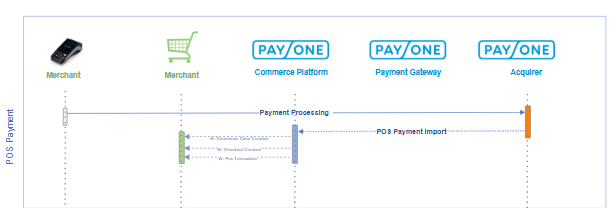
Below there are some of the uses cases where Webhook usage and implementation provides a cursive and reliable usage of Commerce Platform services:
Order / Payment Lifecycle Synchronization
Process payment.\* events (e.g. payment.authorization_requested, payment.captured, payment.refunded) to update internal order update , trigger fulfillment and continue with products management.
Checkout Session Management
React to checkout.\* events (checkout.created, checkout.updated, checkout.deleted) to monitor transaction imitations, comparison between new and completed checkouts and close stale sessions.
Refund Processing & Customer Communication
Use refund.\* events (refund.created, refund.captured, refund.refunded) to send refund confirmations, update ledger entries, and adjust loyalty balances.
Payout Settlement Confirmation
Leverage payout.\* events (payout.created, payout.account_credited, payout.reversed) to reconcile merchant settlement, move funds in internal finance systems, and generate accounting journal lines.
Case / Issue Tracking
Handle commerce_case.\* events (commerce_case.created, commerce_case.updated) to inquiry data with CRM / support for consumer management, multiple checkouts handling for singular commerce case.
Chargeback & Risk Response
Monitor payment.\* chargeback events (payment.chargeback_notification, payment.chargebacked, payment.chargeback_reversed) for automated risk scoring adjustments.
Inventory & OMS Triggers
On payment.captured or payment.refunded propagate stock decrement / replenishment. This ensures near real‑time availability across channels.
Accounting & Financial Reconciliation
Aggregate payment.captured, refund.refunded, payout.account_credited to construct daily settlement summaries, verify net amounts, and close financial periods.
Point Of Sale Real time Transaction Notification
With payment_information.created our system automatically notifies you when a POS transaction is imported including the Terminal ID , allowing a real time monitoring and KPI calculation.