Introduction
|
|
Modern e-commerce success is measured not only by traffic and conversion, but increasingly by how quickly a customer can complete a purchase. Every additional step in the checkout — entering an address, selecting a shipping option, typing card details — directly contributes to cart abandonment, especially on mobile devices where typing is cumbersome. Apple Pay Express Checkout addresses this challenge by enabling customers to complete an entire purchase with a single tap directly from the product page, cart, or mini-cart — without ever navigating through a traditional checkout process. All required information (shipping address, billing address, contact details, and payment credentials) is securely retrieved from the customer's Apple Wallet. |

Overview
This guide assumes that the merchant has already implemented standard Apple Pay on the Payone platform (button rendering, merchant validation, payment authorization, and token forwarding to Payone's PSP endpoint). It focuses on the incremental changes required to enable the Express experience and to handle dynamic shipping, address, and contact updates.
Key benefits:
- Single-tap checkout from product or cart pages.
- No need for the customer to manually enter shipping/billing data.
- Higher conversion rates, especially on mobile.
- Reuse of the existing Apple Pay merchant identifier, certificates, and Payone PSP integration.
Difference Between Standard and Express Apple Pay
| Aspect | Standard Apple Pay | Apple Pay Express |
| Trigger location | Final checkout page (after address & shipping selected) | Product page, cart page, or mini-cart |
| Address collection | Collected by merchant beforehand | Collected directly via Apple Pay sheet |
| Shipping methods | Pre-selected by merchant | Dynamically shown & updated inside the sheet |
| requiredShippingContactFields | Optional | Mandatory (postalAddress, name, email, phone) |
| requiredBillingContactFields | Optional | Recommended (postalAddress, name) |
| shippingMethods | Optional | Required — at least one method must be provided |
| Event handlers | onvalidatemerchant, onpaymentauthorized | Adds onshippingcontactselected & onshippingmethodselected |
| Total recalculation | Static at the time of authorization | Dynamic — recalculated on every address/shipping change |
| Payone PSP integration | Default flow with Payment Authorization | Unchanged — same flow |
| Merchant certificates / Apple Merchant ID | Required | Unchanged — no changes |
What does NOT change:
- Merchant ID & Apple Pay certificates registered in the Apple Developer account.
- Merchant validation flow (onvalidatemerchant → Payone init_applepay_session).
- Payone PSP endpoint and Payment logic - there are no changes on how you call Payone API compared to the default integration.
- Domain verification files hosted on the merchant site.
What DOES change:
- The location and timing of the Apple Pay button.
- The ApplePayPaymentRequest payload (extra fields).
- Two new event handlers must be implemented.
- Order creation logic on the merchant backend must accept addresses returned after payment authorization (in the Apple Pay form - NOT from Payone) (rather than before).
---end
Prerequisites
Before enabling Apple Pay Express, ensure the following are in place:
---end
- Standard Apple Pay integration with Payone is fully functional - Please follow our Apple Pay integration Guide .
- Apple Pay JS API v4 or higher loaded on the page.
- HTTPS with a valid TLS certificate on all domains where the Express button is rendered.
- Backend service capable of:
- Calculating shipping costs dynamically based on a postal address.
- Recalculating totals (subtotal + shipping + tax) on demand.
- Creating an order using addresses provided after payment authorization with Apple Pay.
- Frontend that can render the Apple Pay button on product / cart pages.
- (Optional, for Non-Safari browsers) Implementation of the W3C Payment Request API for cross-browser support via QR-code handoff to iPhone.
---end
---end
Express checkout flow
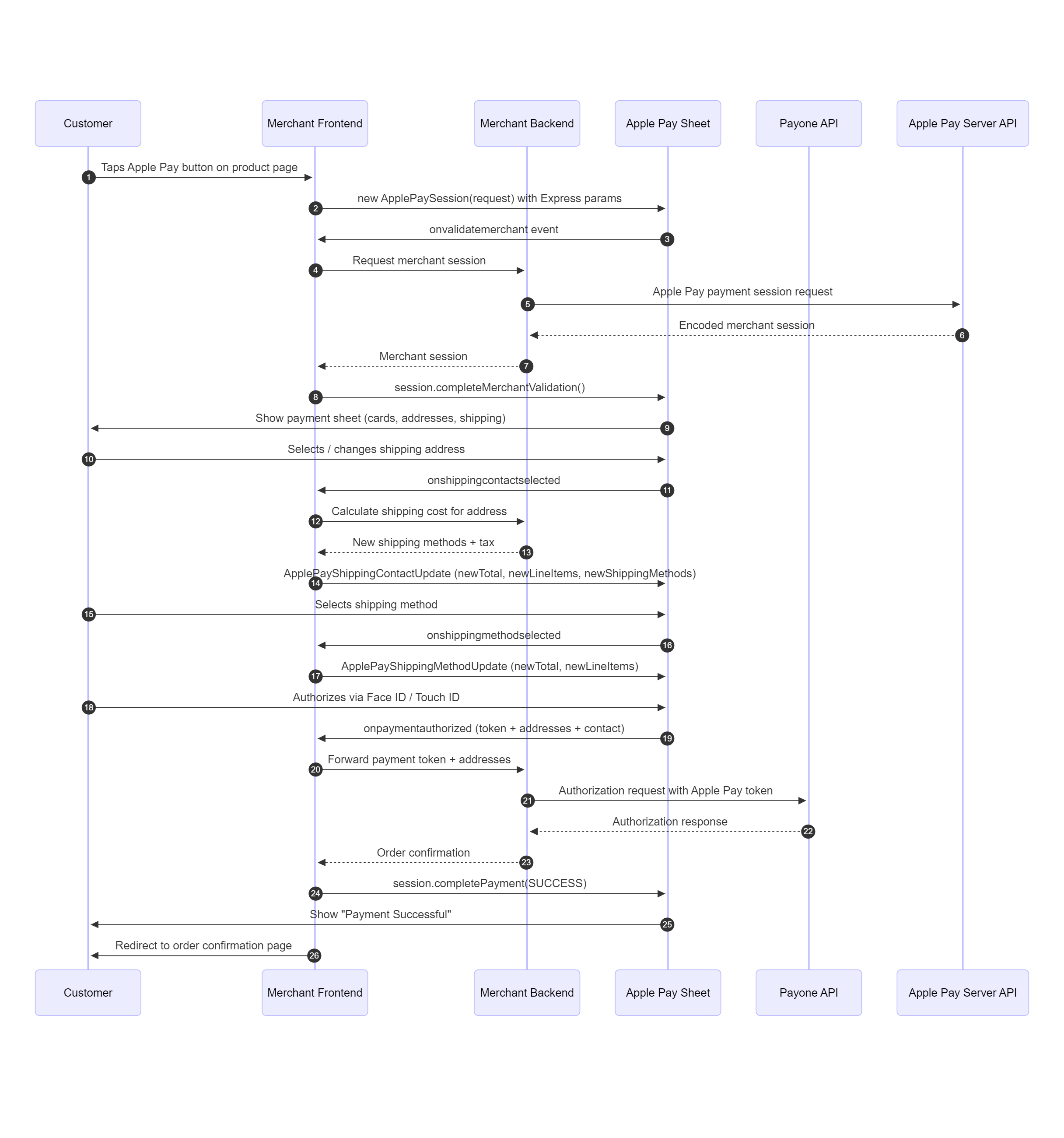
---end
---end
---end
Integration guide
Enabling Express Checkout in the Payment Request
---end
In order to retrieve address information that is needed for the express checkout, following configuration steps below.
Add shipping configurations to the payment request
- requiredShippingContactFields
- requiredBillingContactFields.
required contact fields in the payment request
  const paymentRequest = {
        ...,
      "requiredBillingContactFields": [
        "postalAddress",
        "name"
    ],
    "requiredShippingContactFields": [
        "postalAddress",
        "name",
        "phone",
        "email"
    ],
 };
| Field | Purpose |
| requiredBillingContactFields | Forces Apple Pay to return billing details with the token. Required for Payone authorization in most regions. |
| requiredShipp | Triggers the address selector inside the Apple Pay sheet, enabling Express. |
---end
---end
Event Handlers for Express Checkout
Apple Pay exposes the following event handlers for Express. They are activated automatically when the corresponding fields are set in the ApplePayPaymentRequest.
| Event Handler | Triggered By | Description | Requirement |
| onshippingcontactselected | User selects/changes a shipping address | Validate the address and update shipping methods, totals, and line items. | Required for Express |
| onshippingmethodselected | User picks a different shipping method | Recalculate the total and line items. | Required for Express |
| onpaymentauthorized | User confirms payment with Face/Touch ID | Receive the encrypted token, billing/shipping address, and contact info. | Mandatory for Apple Pay |
Dynamic Shipping Cost Calculation
Both onshippingcontactselected and onshippingmethodselected are used to dynamically update shipping cost and totals :
const newShippingMethods = methods;
  const selected = newShippingMethods[0];

  const newLineItems = [
    { label: 'Subtotal', amount: '100.00' },
    { label: 'Shipping', amount: selected.amount },
    { label: 'Tax',      amount: tax }
  ];
  const newTotal = {
    label: 'My Store',
    amount: (100 + Number(selected.amount) + Number(tax)).toFixed(2)
  };
Return the corresponding update object to Apple Pay:
session.completeShippingContactSelection({
  newShippingMethods,
  newTotal,
  newLineItems
});
Defining Shipping Methods
Provide the shippingMethods array in the initial ApplePayPaymentRequest to define the available shipping options.
Each shipping method has the fields:
- identifier — internal ID used to map the selection back to your backend.
- label — display name in the sheet.
- detail — secondary description (e.g., delivery time).
- amount — cost of the option.
- dateComponentsRange (optional) — delivery date estimate shown in the sheet.
The first method in the array is used as the default. The list can be updated dynamically inside onshippingcontactselected (e.g., based on the selected country).
 "shippingMethods": [
        {
            "label": "Free Standard Shipping",
            "amount": "0.00",
            "detail": "Arrives in 5-7 days",
            "identifier": "standardShipping",
            "dateComponentsRange": {
                "startDateComponents": {
                    "years": 2026,
                    "months": 4,
                    "days": 27,
                    "hours": 0
                },
                "endDateComponents": {
                    "years": 2026,
                    "months": 4,
                    "days": 29,
                    "hours": 0
                }
            }
        },
        {
            "label": "Express Shipping",
            "amount": "1.00",
            "detail": "Arrives in 2-3 days",
            "identifier": "expressShipping",
            "dateComponentsRange": {
                "startDateComponents": {
                    "years": 2026,
                    "months": 4,
                    "days": 24,
                    "hours": 0
                },
                "endDateComponents": {
                    "years": 2026,
                    "months": 4,
                    "days": 25,
                    "hours": 0
                }
            }
        }
    ]
Shipping Type
Optional. Customizes the label shown in the payment sheet.
Sample suggestion:
| Value | Sheet Label |
| shipping | "Shipping" |
| delivery | "Delivery" |
| storePickup | "Store Pickup" |
| servicePickup | "Service Pickup" |
---end
Handling the Authorized Payment
After the customer authenticates via Touch ID / Face ID, the onpaymentauthorized event fires and you receive an ApplePayPayment object containing:
- The encrypted payment token (paymentData) — to be forwarded to Payone for Payment processing (Same as for the default integration).
- The billing contact (address + name).
- The shipping contact (address, name, phone, email).
- The selected shipping method.
This token.paymentData payload must be forwarded to the Payone API (same flow as the standard Apple Pay integration — typically via the authorization / preauthorization request with clearingtype=wlt and wallettype=APL).
The billingContact and shippingContact returned here are the authoritative addresses for the order — your backend must use them when creating the order record.
---end
onpaymentauthorized Sample
{
  "token": {
    "paymentData": {
      "version": "EC_v1",
      "data": "3+f4oOTwPa6f1UZ6tG...CE=",
      "signature": "MIAGCSqGSIb3DQ...AAAA==",
      "header": {
        "ephemeralPublicKey": "MFkwEK...Md==",
        "publicKeyHash": "l0CnXdMv...D1I=",
        "transactionId": "32b...4f3"
      }
    },
    "paymentMethod": {
      "displayName": "Visa 1234",
      "network": "Visa",
      "type": "debit"
    },
    "transactionIdentifier": "32b...4f3"
  },
  "billingContact": {
    "addressLines": ["1 Street", ""],
    "administrativeArea": "",
    "country": "United Kingdom",
    "countryCode": "GB",
    "familyName": "Appleseed",
    "givenName": "John",
    "locality": "London",
    "postalCode": "AB12 3CD",
    "subAdministrativeArea": "",
    "subLocality": ""
  },
  "shippingContact": {
    "addressLines": ["1 Street", ""],
    "...": "..."
  }
}
---end
COnfiguration sample
Payment request object with express checkout relevant parameters - ApplePayRequestObject
{
  "countryCode": "US",
  "currencyCode": "USD",
  "merchantCapabilities": [
    "supports3DS",
    "supportsDebit",
    "supportsCredit"
  ],
  "shippingMethods": [
    {
      "label": "Free Standard Shipping",
      "amount": "0.00",
      "detail": "Arrives in 5-7 days",
      "identifier": "standardShipping",
      "dateComponentsRange": {
        "startDateComponents": { "years": 2026, "months": 4, "days": 27, "hours": 0 },
        "endDateComponents":   { "years": 2026, "months": 4, "days": 29, "hours": 0 }
      }
    },
    {
      "label": "Express Shipping",
      "amount": "1.00",
      "detail": "Arrives in 2-3 days",
      "identifier": "expressShipping",
      "dateComponentsRange": {
        "startDateComponents": { "years": 2026, "months": 4, "days": 24, "hours": 0 },
        "endDateComponents":   { "years": 2026, "months": 4, "days": 25, "hours": 0 }
      }
    }
  ],
  "shippingType": "shipping",
  "supportedNetworks": ["visa", "masterCard", "amex", "discover"],
  "requiredBillingContactFields": ["postalAddress", "name"],
  "requiredShippingContactFields": ["postalAddress", "name", "phone", "email"],
  "lineItems": [
    { "label": "Sales Tax", "amount": "0.00" },
    { "label": "Shipping",  "amount": "0.00" }
  ],
  "total": {
    "label": "Demo",
    "amount": "1.99",
    "type": "final"
  }
}
---end
---end